How can you edit face photos when an image is almost perfect, but the subject’s expression doesn’t quite work? Or when you want to use an image for commercial purposes but don’t have a model release? For years, the answer had only one name: Photoshop. And only one cost: hundreds of euros for a license, months of learning, and hours of work for every single edit. Artificial intelligence has changed the rules. Today, there are tools that allow you to edit faces professionally, quickly, and accessibly, even without graphic design skills. This guide explores the most effective alternatives for those looking for immediate results.
Why look for alternatives to Photoshop for face editing
Adobe Photoshop remains the industry standard, but it comes with significant barriers. A Creative Cloud subscription costs around €30 per month, over €300 per year, for software that many people use only occasionally. The learning curve is steep: mastering the basics takes months, achieving professional results can take years.
Every edit requires knowledge of layers, masks, selection tools, and color correction. Even a simple change in facial expression can take hours of manual work.
E-commerce managers, content creators producing daily materials, and photographers working under tight deadlines all need faster solutions. AI-based alternatives automate processes that would otherwise require advanced Photoshop skills.
The best online tools for editing face photos
The landscape of online editors has expanded with highly specialized solutions.
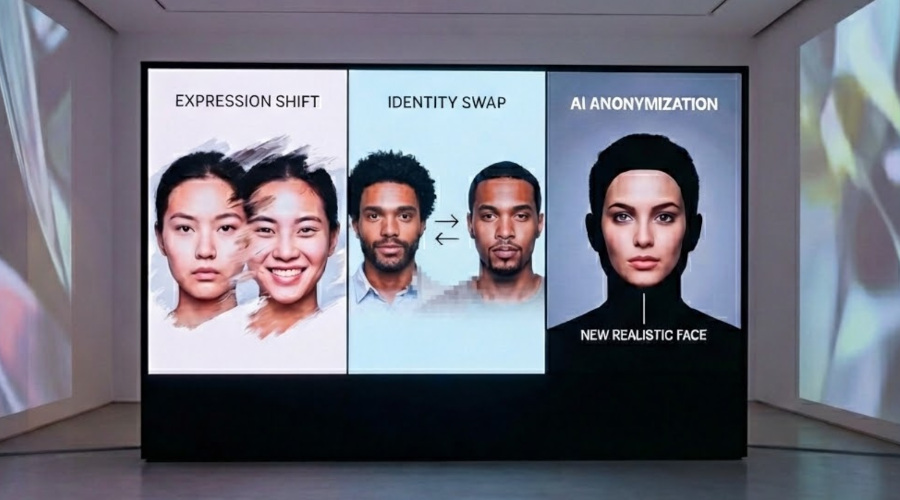
PiktID focuses specifically on face manipulation using advanced AI: expression changes, anonymization for privacy, and identity swapping. The technology delivers natural-looking results suitable for professional use.
Canva offers more general editing, ideal for social graphics and quick content, but it is limited when it comes to complex facial modifications.
Fotor positions itself as a complete editor with filters and automatic retouching, effective for basic corrections but less precise for altering facial structures.
Remove.bg specializes in background removal, with secondary features that do not cover advanced face editing.
The choice depends on your specific needs: Canva works well for occasional improvements, while professionals working with portraits benefit from specialized tools like PiktID.
How to edit face photos with PiktID
The process is straightforward, even for users with no prior editing experience. You access the Studio platform, part of the PiktID ecosystem dedicated to face manipulation. Uploading is done via drag & drop or direct upload, just use a good-resolution photo.
The interface displays the available tools. By selecting “Change Expressions,” you can modify the emotional tone of the subject. An intuitive panel with sliders appears, allowing you to control the intensity of the change, from subtle to more pronounced.
A real-time preview instantly shows the effect, making it easy to fine-tune the result. This online facial expression editing feature is especially useful for photographers who want to adjust the emotion conveyed without reshooting. The entire process takes just minutes: upload, adjust, download.
What face edits you can make without technical skills
AI has democratized edits that once required senior-level graphic design expertise.
Changing expressions transforms a serious face into a smiling one, adjusting facial muscles and micro-expressions to maintain realism. Anonymization protects identity by generating different faces that remain consistent with the original context, essential for privacy-compliant publications.
Face swapping replaces identities while preserving pose, lighting, and framing.
Age editing virtually ages or rejuvenates subjects.
Ethnicity modification allows brands to represent diversity in marketing campaigns without multiple castings.Hairstyle changes let you test different looks instantly.
All of these edits are performed through simple visual controls: the user indicates the goal, and the AI handles the complex operations.
When to use AI face editing in your work
Professional use cases span multiple industries. In fashion e-commerce, brands generate model variants for different geographic markets without increasing production costs.
In marketing, A/B testing facial expressions reveals which emotion maximizes engagement.
GDPR compliance requires special attention to privacy when publishing photos of people, as highlighted by data protection regulations. Face anonymization becomes mandatory for schools sharing event photos, journalists covering public demonstrations, and public institutions communicating activities.
Professional photographers can diversify their portfolios without multiple castings, starting from a single shoot and generating multiple variants. Commercial use without model releases becomes possible when faces are fully replaced by AI-generated identities. Content creators can produce fresh social media material without constantly photographing themselves.
Mistakes to avoid when editing face photos
The power of AI tools also carries risks. Overdoing intensity can create the “uncanny valley” effect, faces look almost real, but something feels off. Subtle adjustments usually deliver better results.
Starting from low-resolution images limits output quality: a pixelated photo cannot become a professional portrait. Legal issues arise when using copyrighted images commercially, AI edits do not automatically remove copyright constraints.
Inconsistent lighting can expose manipulations: if the face changes drastically but the ambient light remains unchanged, the result may look artificial. High-quality tools handle lighting adjustments automatically.
Which tool should you choose for your needs
The decision depends on three variables. Budget considerations point toward free tools for occasional use or professional subscriptions when volume justifies the investment. Image volume makes a real difference: some tools offer pay-as-you-go plans, while others rely on flat-rate subscriptions. For those managing catalogs with hundreds of products, the second option becomes more cost-effective. The industry of use determines the required features: a content creator prioritizes speed, a commercial photographer does not compromise on quality, a marketing manager looks for flexibility for multiple tests, and public institutions require GDPR compliance. As a practical rule, the more specialized the need, the more important it is to choose dedicated tools. Canva excels at general social graphics, PiktID at complex face editing, and remove.bg at isolating subjects from backgrounds.
The gap between idea and execution has shortened dramatically. What once required days of work can now be achieved in minutes with tools accessible to everyone. Artificial intelligence has lowered entry barriers for those seeking professional results without becoming full-time graphic designers. The democratization of photo editing opens up new opportunities: small e-commerce businesses competing visually with major brands, freelancers expanding their service offerings, and organizations communicating while respecting privacy. The technology is mature, accessible, and effective. All that remains is to experiment and find the tool that best fits your workflow.